Webhooks
Subscribe to webhooks to automate fraud and security workflows
Introduction#
Webhooks is a way for Castle to communicate directly with your application, when certain conditions are met, like when e.g. suspicious accounts or devices are detected. This way you can use Castle to automate task like suspending these suspicious accounts, marking them for review, or any other relevant business action you may way to take. Webhooks can be triggered based on the following:
- Whenever a certain Policy match
- Whenever a specific action (challenge or deny) is returned by the Policy evaluation.
- Whenever an item is added or removed from a List
Webhook events#
To inform your application which type of trigger condition happened, Castle adds an event name to the payload of the webhook. Below is a list of available events, and their meaning
| Event name | Description |
|---|---|
| $list_item.created | A new item was added to a List. By default, new items are active and will match against incoming events. |
| $list_item.archived | An item in a list was archived and is no longer present in the list (equivalent to removed) |
| $list_item.unarchived | A previously archived item was un-archived and is now present in the list again |
| $policy.matched | The conditions of a policy matched |
Configuring webhooks#
To set up a new webhook, either navigate to the Policy page or the Lists page, depending on what type of condition you’d like the webhook to be based on. On each of these page, there is a tab called “Integrations” where you’ll find any existing Webhooks as well as the ability to set up a new one. Just click “Add Integration”.
On the integrations tab you also have the possibility to set up other types of notifications, like eg. Slack
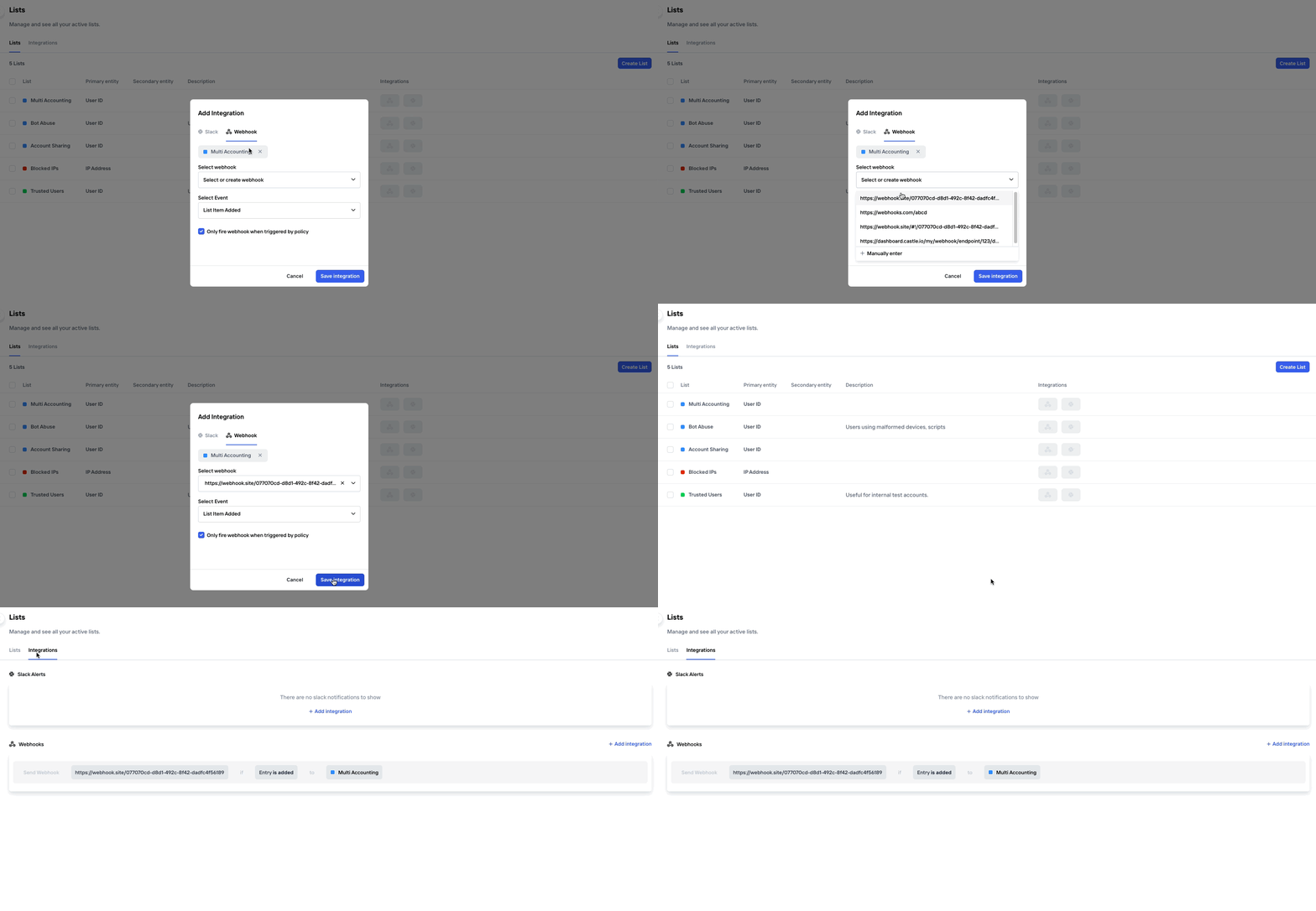
Alternatively, a new webhook can be configured directly from a List or Policy entry
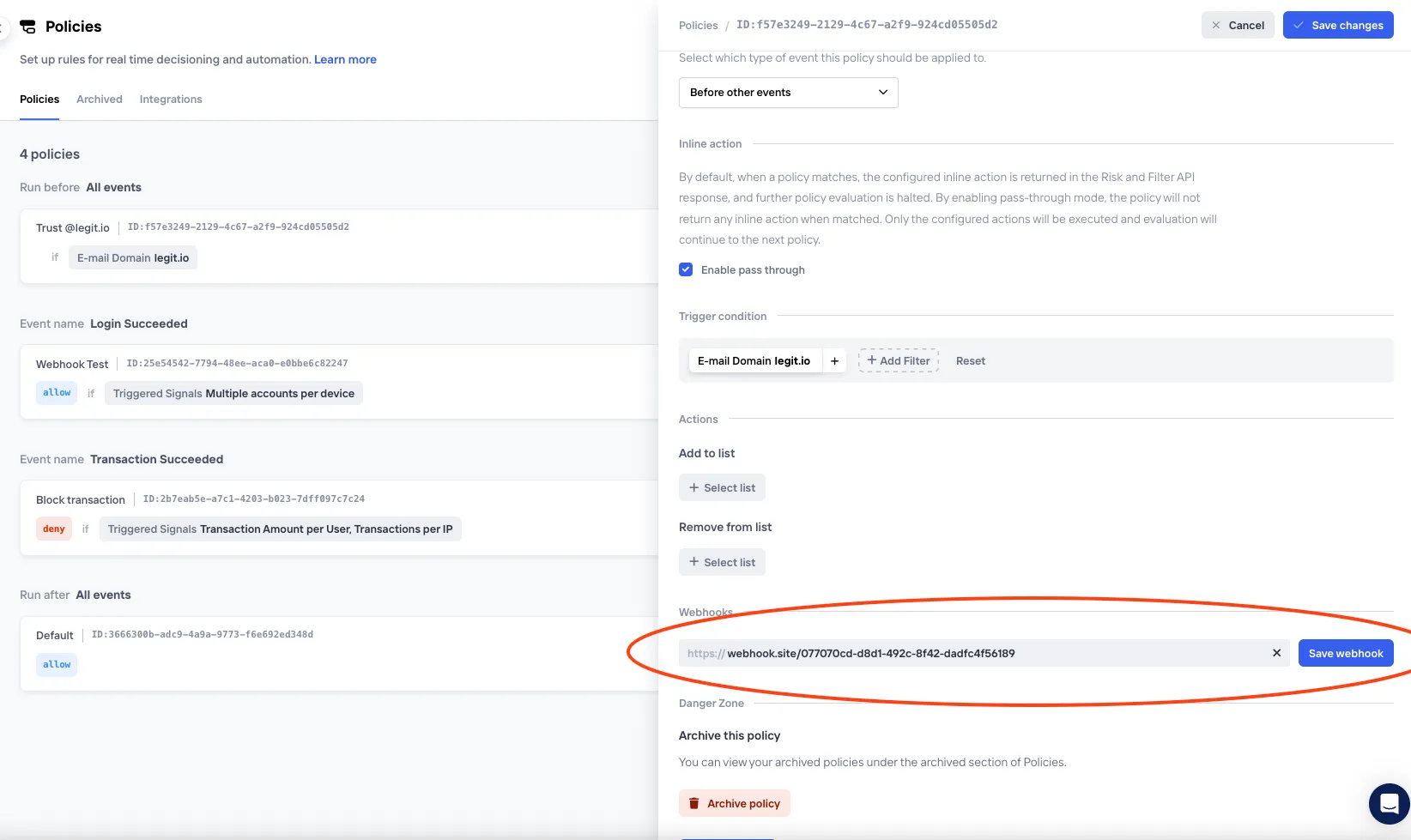
Server side implementation#
Below outline the necessary technical steps to prepare your application for receiving webhooks from Castle in a secure and robust way.
Whenever conditions for triggering webhooks are met, Castle will send an HTTP POST request to the configured endpoint URL using a JSON formatted data payload. At minimum, the webhook endpoint needs to expect and handle an HTTP POST request and confirm successful receipt of the data by returning a 2xx HTTP status code. Below are the key steps for successfully building out a webhook endpoint
HTTPS URL
If you are using an HTTPS URL for your webhook endpoint, Castle will validate that the connection is secure and your server must be correctly configured with a valid certificate.
Timeouts
Your server must accept the connection within 2 seconds and respond within 5 seconds. Castle treats a slower response as a timeout and retries the webhook.
Try out the Castle webhooks#
Before starting the implementation, it can be useful to try out the webhooks functionality and get to know the data:
- Use a service like Webhook Tester to set up a temporary endpoint
- Configure a new webhook trigger via the Castle Dashboard. For example, you can configure a Castle Policy to trigger a webhook whenever the email domain
example.comis observed. - Then send a test request to Castle with the
params.emailset totest@example.com - Watch the webhook appear in the web interface of Webhook Tester
Parse the payload#
The data in the webhook request sent by Castle will be formatted using JSON and this will be indicated by the Content-Type HTTP header which will be set to application/json . For a complete specification and example of the content of the request body, see the example webhook. Your code for handling webhooks is expected to parse the request body into an object.
Request headers#
Every webhook request carries these headers:
| Header | Value |
|---|---|
Content-Type | application/json |
User-Agent | Castle webhook |
X-Castle-Signature | The HMAC-SHA256 signature of the request body. See Check the signature. |
X-Castle-Environment-Id | The ID of the Castle environment that sent the webhook, as shown in the Castle Dashboard. |
X-Castle-Webhook-Id | The ID of the webhook that sent the request. Use it to tell several webhooks on the same URL apart. |
The request body does not include the environment ID, so use X-Castle-Environment-Id when one endpoint receives webhooks from several environments. These headers are not signed on their own, so only trust them after the signature check passes.
Respond with a status code#
To let Castle know that you have received the webhook successfully, your endpoint must return a 2xx HTTP status code. Codes that are not in this range, including 3xx codes, will be treated as unsuccessful by Castle. Castle does not follow redirects.
4xx and 5xx HTTP status codes typically indicate an issue with your endpoint. 4xx indicates Castle sent a request to your server, but the endpoint was not valid, such as a 404 which indicates that the path doesn’t exist. If a 5xx code is returned this usually indicates an unhandled exception in your application code.
Retries#
Castle sends a webhook again when a delivery fails with one of these results:
- A connection error or a timeout
- HTTP status
408or429 - An HTTP
5xxstatus
Castle sends the webhook again up to six more times, with exponential backoff. All the retries occur in approximately 20 minutes. After the last retry, Castle does not send that webhook again.
If the response has a Retry-After header, Castle waits for that time before the next retry. Castle drops a webhook that would wait for more than 20 minutes in total.
Castle does not send the webhook again when your endpoint returns any other 3xx or 4xx status.
Circuit breaker#
Castle protects each webhook with a circuit breaker. When your endpoint keeps failing, Castle stops sending to it for a short while instead of piling up retries, and then checks whether it has recovered.
| Parameter | Value | Meaning |
|---|---|---|
| Failure threshold | 5 consecutive failures | Failures are the same ones that trigger a retry: connection errors, timeouts, 408, 429 and 5xx. |
| Open duration | 30 seconds, then 2 minutes, then 4 minutes | How long Castle holds back deliveries. Each failed recovery check moves to the next, longer duration, and stays at 4 minutes after that. |
| Recovery check | 1 webhook | When the open duration ends, Castle sends a single webhook. If it succeeds, the circuit closes and deliveries resume normally. If it fails, the circuit opens again. |
| Maximum wait | 20 minutes | Webhooks queue up while the circuit is open. A webhook that would wait longer than 20 minutes in total is dropped. |
The circuit breaker is shared across all of Castle’s servers, so a failing endpoint is paused everywhere at once.
Automatic disabling
Castle disables a webhook when:
- its deliveries have kept failing in a way that triggers a retry for 3 days, or
- your endpoint returns HTTP status
410 Gone.
A disabled webhook receives nothing.
Test your webhook endpoint#
To test your webhook implementation, follow the same steps outlined in the above section for trying the Castle Webhooks, and simply replace the URL to your publicly facing application webhook URL. It’s a good idea to continuously test your webhooks endpoint implementation, especially:
- Upon Creation of a webhook endpoint
- After deploying it to a live environment
- After making any changes
Check the signature#
This step is optional, but highly recommended. Since a webhook endpoint is a publicly facing URL, anyone could potentially send requests to it, pretending to be Castle, if they got hold of the URL. In order to protect from spoofing, Castle includes a signature header, X-Castle-Signature, in the request so that you can verify the authenticity of the request. The signature is a Hash-based Message Authentication Code using the SHA256 hashing function (HMAC-SHA256) and is computed with the raw JSON request body together with the API secret. To validate the request, simply compute the HMAC within the code that handles the webhook and compare it to the value sent in the signature header. The two values should match.
Example signature checking code:
require 'json'

# Using Sinatra
require 'rubygems'
require 'base64'
require 'openssl'
require 'sinatra'

helpers do
  # Compare the computed HMAC digest based on the shared secret and the
  # request contents to the reported HMAC in the headers
  def verify_webhook(data, hmac_header)
    digest  = OpenSSL::Digest.new('sha256')
    calculated_hmac =
      Base64.encode64(OpenSSL::HMAC.digest(
        digest,
        'YOUR_API_SECRET',
        data)
      ).strip
    calculated_hmac == hmac_header
  end
end

# Respond to HTTP POST requests sent to this web service
post '/' do
  request.body.rewind
  data = request.body.read
  hmac_header = request.headers['X-Castle-Signature']
  verified = verify_webhook(data, hmac_header)

  # IMPLEMENT: handle the alert

  # Output 'true' or 'false'
  puts "Webhook verified: #{verified}"
end
Allowlisting Castle IPs#
For additional security, you may want to ensure that the webhooks hitting your endpoint are in fact from Castle.
Production webhooks will always be sent from the following set of IP Addresses:
34.194.74.182
23.20.75.190
34.194.26.104
Example webhook data#
Policy triggered#
{
  "api_version": "v1",
  "created_at": "2024-12-06T21:35:56.260Z",
  "type": "$policy.matched",
  "data": {
    "policy": {
      "id": "bccf9b8b-0b40-4c1b-8843-29288fff3752",
      "revision_id": "",
      "name": "Trust @legit.io",
      "action": "allow"
    },
    "event": {
      "id": "2prOvFQjWDuDXVbRuY4FHBw1QqG",
      "name": "Login Succeeded",
      "type": "$login",
      "status": "$succeeded",
      "created_at": "2024-12-06T21:35:56.087Z",
      "authenticated": true,
      "changeset": {
        "email": {
          "changed": false
        },
        "password": {
          "changed": false
        },
        "name": {
          "changed": false
        },
        "phone": {
          "changed": false
        }
      },
      "device": {
        "fingerprint": "vuDfvDLmR4qiOvmZtcSxqQ",
        "software": {
          "languages": [
            "en-us",
            "en"
          ],
          "fingerprint": "B7GzjEI7ZDDWNP2va6jJdw",
          "type": "browser",
          "name": "Chrome",
          "version": {
            "major": "131",
            "full": "131.0.0"
          }
        },
        "timezone": {
          "offset": -480,
          "name": "America/Los_Angeles"
        },
        "os": {
          "name": "Mac OS X",
          "version": {
            "major": "Catalina",
            "full": "10.15.7"
          }
        },
        "hardware": {
          "name": "Mac",
          "brand": "Apple",
          "type": "computer",
          "display": {
            "width": 1680,
            "height": 1050
          }
        },
        "user_agent": "Mozilla/5.0 (Macintosh; Intel Mac OS X 10_15_7) AppleWebKit/537.36 (KHTML, like Gecko) Chrome/116.0.0.0 Safari/537.36",
        "screen": {
          "density": 1.6
        }
      },
      "email": {
        "value": "adam@legit.io",
        "normalized": "adam@legit.io",
        "domain": "legit.com",
        "disposable": false,
        "unreachable": false,
        "domain_details": {
          "created_at": "1998-06-11T00:00:00.000Z",
          "updated_at": "2023-06-06T01:09:20.000Z",
          "expires_at": "2024-06-10T04:00:00.000Z",
          "registrar": "corp register",
          "registrant": "Legit USA, Inc.",
          "nameservers": [
            "nameserver1"
          ],
          "spf_record": {
            "exists": true
          },
          "dmarc_record": {
            "exists": true
          },
          "mx_records": {
            "null_mx": false
          }
        }
      },
      "endpoint": "/v1/risk",
      "ip": {
        "address": "85.222.81.170",
        "asn": 7922,
        "isp": {
          "name": "Comcast Cable",
          "organization": "Comcast Cable"
        },
        "location": {
          "city": "Brooklyn",
          "country_code": "US",
          "continent_code": "NA",
          "latitude": 90.282,
          "longitude": -100.0004,
          "postal_code": "11245",
          "region_code": "NY"
        },
        "privacy": {
          "anonymous": false,
          "datacenter": false,
          "proxy": false,
          "tor": false
        },
        "type": "ipv4"
      },
      "metrics": {
        "users_per_device_fingerprint": {
          "value": 1
        }
      },
      "policy": {
        "action": "allow",
        "id": "bccf9b8b-0b40-4c1b-8843-29288fff3752",
        "name": "Trust @legit.io",
        "revision_id": "46655da6-6ccb-4590-82a9-cae7d26baf6b"
      },
      "scores": {
        "account_abuse": {
          "score": 0.821
        },
        "account_takeover": {
          "score": 0.207
        },
        "bot": {
          "score": 0.849
        }
      },
      "sdks": {
        "client": {
          "name": "castle-web",
          "version": "2.6.1"
        },
        "server": {
          "name": "castle-rb",
          "version": "7.2.0"
        }
      },
      "user": {
        "id": "bede8b63-8f77-4ae0-bdd7-751e743a221b",
        "email": "adam@legit.co",
        "name": "adam@legit.co",
        "registered_at": "2018-02-20T23:04:24.371Z",
        "traits": {
          "organization_name": "legit",
          "organization_linked_in_page": "",
          "organization_domains": ""                        }
      },
      "signals": {
        "replayed_device_data": {}
      }
    }
  }
}
List triggered#
{
  "api_version": "v1",
  "created_at": "2023-09-22T10:02:44.292Z",
  "type": "$list_item.created",
  "data": {
    "id": "42bc2f4d-64d1-4291-a77f-61c64bd410a0",
    "primary_value": "68776fee69c9c520022ea3267b5216b1",
    "secondary_value": null,
    "auto_archives_at": null,
    "author": {
      "type": "$castle_policy",
      "identifier": "25e54542-7794-48ee-aca0-e0bbe6c82247",
      "details": {
        "policy": {
          "id": "25e54542-7794-48ee-aca0-e0bbe6c82247",
          "revision_id": "",
          "name": "Webhook Test",
          "action": "allow"
        }
      }
    },
    "comment": null,
    "list": {
      "id": "a7f498f2-5788-40f0-9ebd-fdef3029ad59",
      "name": "Multi Accounting",
      "primary_field": "user.id",
      "secondary_field": null
    }
  }
}